
Settings
Open Settings with Ctrl+, (⌘ , on Mac) or the Settings button at the bottom of the sidebar. Pick a group on the left.
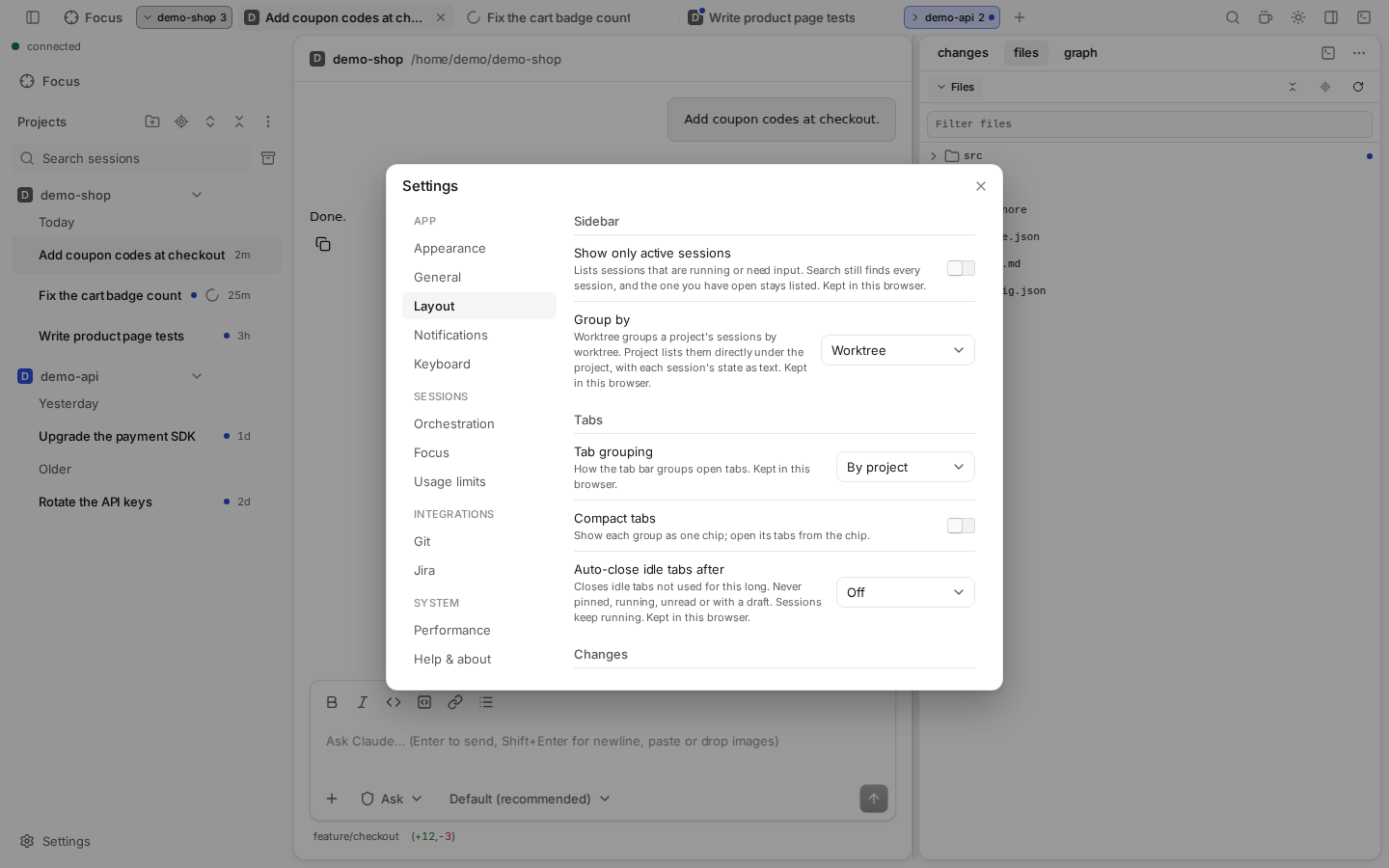
The groups sit under four headings:
| Heading | Groups |
|---|---|
| App | Appearance, General, Layout, Notifications, Keyboard |
| Sessions | Orchestration, Focus, Chat, Usage limits |
| Integrations | Git, Jira |
| System | Sides, Performance, Help & about |
Most settings are kept in this browser only. Orchestration, Focus, Chat, Usage limits (except the ring), Git, Jira, Sides, Performance and desktop notifications are saved in the daemon and apply to every browser.
Appearance
| Setting | Options |
|---|---|
| Theme | Default, Catppuccin, Tokyo Night, Solarized, Nord, Dracula, One. Recolors the app, the editor, diffs, the terminal and the git graph at once. Dracula has no light colors: in light mode it shows Default. Kept in this browser. |
| App name and icon | Your own name and icon (an emoji or an image) for the browser tab and the installed app. Change… opens the editor; an empty name means "Claude UI". Saved in the daemon: it applies to every browser of this Claude UI. The tab changes at once. An installed app takes it when the browser next checks for updates (up to a day) or after you reinstall it. |
The theme button at the top right still cycles System, Light and Dark inside the theme.
General
Timeline
| Setting | Does |
|---|---|
| Signal only | Folds each run of tool calls into one line, like "4 tool calls · Read 3 · Grep 1". Your prompts, Claude's text, errors and waiting requests stay. Also Ctrl+Alt+S. |
Sending
| Setting | Does |
|---|---|
| While Claude works, Enter | Steers the turn (default; Alt+Enter queues) or queues the message (Alt+Enter steers). A queued message waits and starts its own turn when Claude is idle. The send button follows the choice. |
Screen
| Setting | Does |
|---|---|
| Keep screen awake | Holds the screen on while claude-ui is open. See Keep screen awake. |
| Only while a session is running | Holds it only while a session runs or waits for you. |
Layout
Sidebar
| Setting | Does |
|---|---|
| Show only active sessions | Lists only sessions that run or need input. Search still finds all. |
| Group by | Worktree groups a project's sessions by worktree. Project lists them right under the project, with their state as text. |
Tabs
| Setting | Does |
|---|---|
| Tab grouping | By project, By worktree, or None |
| Compact tabs | Shows each group as one chip. Open its tabs from the chip. Needs a tab grouping. |
| Auto-close idle tabs after | Off, 1 hour or 1 day. Never closes pinned, running or unread tabs, or tabs with a draft. Sessions keep running. |
Changes
| Setting | Options |
|---|---|
| Default diff view | Session changes, Uncommitted, Against branch |
Terminal
| Setting | Does |
|---|---|
| Terminal position | Bottom (default), Side panel or Main area (a tab next to the session). See Panes & layout. |
Notifications
| Setting | Does |
|---|---|
| In-app notifications | A card in this page when another session needs input or finishes. On by default. |
| Push notifications | Notifications from this browser, also with the page closed. Needs HTTPS or localhost. |
| Desktop notifications on computer | The daemon's computer shows a system notification when no browser has push on. For every browser. |
See Notifications.
Keyboard
Opens the Keyboard shortcuts dialog, where you can rebind every shortcut. Show shortcut tips: after the 2nd, 5th and 10th click on a button, a tip shows its shortcut or offers to assign one. Not on touch screens.
Orchestration
Lets a session start and steer worker sessions. Off by default. Notifications from workers turns notifications for worker sessions on or off. Every setting is described on the Orchestration page.
Focus
| Setting | Does |
|---|---|
| Next for you | After a turn, Claude predicts your next prompt; finished rows on Focus show it as a chip. Off by default. Uses a small extra request per turn that reuses the prompt cache. Applies to sessions started or resumed after the change. |
Chat
| Setting | Does |
|---|---|
| Inline visualizations | Claude can draw charts, diagrams and small interactive widgets in its replies (details). On by default. Applies to sessions started or resumed after the change; off: they show as code. |
Usage limits
| Setting | Does |
|---|---|
| Continue automatically after a usage limit resets | Sends "continue" to a session that the plan limit stopped, once the limit resets. |
| Usage ring shows | Highest usage, Session (5 h) or Weekly. Kept in this browser. |
Git
The same settings as VS Code's Git extension, with the same names and values. They apply to every project and decide which repositories the repository selector and the file tree marks find.
| Setting | Does |
|---|---|
| Auto repository detection | true (default), subFolders, openEditors or false. |
| Repository scan max depth | How deep to scan for repositories. Default 1; -1 = no limit. |
| Repository scan ignored folders | Folder names skipped while scanning. Default node_modules. |
| Scan repositories | Extra paths to search, relative to the project folder. |
| Ignored repositories | Repositories to leave out. |
| Detect submodules / Detect submodules limit | Find submodules, at most this many (default 10). |
| Ignore submodules | Ignore submodule changes in the file tree. |
| Open repository in parent folders | always (default), never or prompt (behaves as always here). |
Jira
One Jira connection for the Ticket tab of Create worktree.
| Setting | Does |
|---|---|
| Jira URL | Cloud: https://<site>.atlassian.net. Data Center or Server: the https address of your Jira (http only for localhost and 127.0.0.1). Changing the host clears the saved token. |
| Your Atlassian account email. Only for Jira Cloud. | |
| API token / Personal access token | Cloud: an API token from id.atlassian.com › Security › API tokens. Data Center or Server: a personal access token from your Jira profile. Saved on the daemon's computer only (secrets.json), never shown again: the row then says Token set, with Replace and Clear. |
| Branch template | How a ticket names its branch. Default {type}/{key}-{summary}: {type} is bugfix for a Bug, feature for a Story, Task or New Feature, else empty; {key} is the ticket key; {summary} is the summary, shortened. |
| Ticket filter (JQL) | The tickets the Ticket tab lists, e.g. project = ABC AND statusCategory != Done. Typed text searches inside it; a key or ticket URL ignores it. Empty: your open tickets. |
| Test connection | Shows "Connected as your name" or the error. |
Sides
Shown when a WSL distro, container or SSH host is listed. This computer is always listed, with a pencil button for its name and icon. Per side:
| Setting | Does |
|---|---|
| Start with Claude UI | Starts the side with Claude UI, from the next start. Off also removes the side's projects from the sidebar. |
| Update automatically | Installs a new Claude UI build from the bundle. Needs Start with Claude UI. |
| Keep running without Claude UI (minutes) | The Grace period: how long a Hub that Claude UI started on that machine keeps running with no Claude UI attached, no browser connected and no turn running (default 30). A Hub you started there never ends by it. |
| Update | Shown when the Claude UI on an SSH host is older than yours: runs claude-ui update there. |
See WSL, Docker & SSH.
Performance
| Setting | Does |
|---|---|
| Performance monitor | Measures responsiveness on the daemon's computer. Durations and counts only; nothing leaves the computer. Below it: the results, Clear and Export JSON. |
Help & about
Guide
Guided tour: restart the short tour of projects, tabs, files, changes, git graph and terminal.
About
The version of the web app and of the daemon. Include both in a bug report.
Not in Settings
- Mode: the theme button at the top right cycles System → Light → Dark, inside the colour theme you picked in Settings › Appearance.
- Model, mode, effort: per session, in the prompt box.
- Server options (port, roots, remote access): CLI flags.